







Unlike conventional dynamics processing, it doesn’t use attack – decay envelope extraction. The envelope it already has from the analysis. As such the gain change that tracks the music is in sync and symmetrical about the content. By that I mean with a normal compressor you would typically have a fast attack time and slow release which means that the gain quickly drops at the start of a transient and slowly rises at the tail after the transient.
Now you’ll probably think that makes no sense and will sound awful. However it doesn’t sound awful, and here is the reason why. In traditional compression we principally have fast attack and slow release because a compressor cannot predict the future so it doesn’t know when to pull down the level and if it does it slowly a very big transient will push through before it has a chance to bring it down. We have a slow release time because fast gain change will lead to a lot of distortion. Because Har-Bal knows the entire history of the track we don’t need fast attack because we know when to pull the level down. The net result is that the dynamics processing in Har-Bal works more like the volume riding technique of recording engineers of days gone past where they would adjust down the level while the music is being recorded because they knew when the loud parts were coming. This point is clearly illustrated in Figure 11, which shows the difference between envelope detection used traditionally and in Har-Bal.
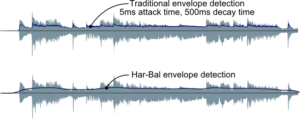
FIGURE 11: A COMPARISON OF ENVELOPE DETECTION IN TRADITIONAL AND HAR-BAL DYNAMICS PROCESSING
By using a slow moving envelope for dynamics processing we ensure that the short term transient material remains largely unaltered and we simply change the relativity between loud and soft passages of a track. This also ensures that very little distortion is introduced by dynamics processing. These two factors are responsible for the clean sound of Har-Bal’s dynamics processing.
Download a tutorial (PDF) on using the Dynamic Node Tool here.

Microsoft Windows
XP SP3, Vista, Windows 7, 8 & Windows 10.

Apple
OS X 10.7